
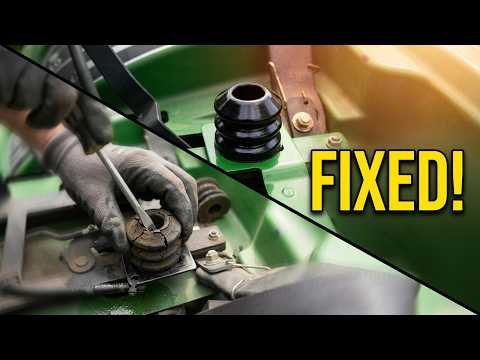
If a John Deere tractor seat feels loose, rattles, or sits incorrectly, worn seat bump stops or bushings may be part of the problem. This video demonstrates a low-cost replacement, and the replacement part should be matched to the tractor’s specific model and seat assembly.
Watch the Original Video

Watch directly on YouTube. This article is a companion resource based on the video title and description with additional general guidance; it is not a full transcript.
Identify the cause first
Not every loose seat is caused by bump stops. Check the seat base, suspension, slide rails, mounting bolts, hinge, and bushings for looseness, cracks, or corrosion. If a seat belt or operator-presence switch is fitted, those components must operate as designed.
Check compatibility
The video’s part may fit a specific John Deere model or seat assembly. Compare the actual part dimensions and model fitment before ordering. A look-alike bumper may have a different height or material and could cause the seat to rest unevenly.
Plan a safe replacement
Park the tractor on level ground, shut the engine down, set the parking brake, and remove the key. Follow the equipment manual for any seat assembly removal, including electrical connectors to operator-presence switches. Never defeat or bypass those safety circuits.
Inspect after installing
Confirm that both bump stops seat securely, the seat sits level and moves through its intended travel without interference, and fasteners remain tight. If the seat still rattles or shifts, inspect the support frame and other mounting points rather than adding improvised padding.
Product links from the original video
Affiliate disclosure: As an Amazon Associate, I earn from qualifying purchases. These links were originally shared with the demonstration and may lead to changed listings. Check current specifications, compatibility, and safety guidance before ordering.
See more tutorials in the Handyman Problem Fixer video library.

0 Comments